
Neon Art Drawing for Android
Overview
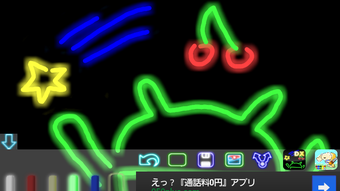
Drawing neon is a creative mobile application developed by miyaware, designed to bring vibrant, neon-inspired artwork to life on Android devices. The app enables users to draw with glowing, neon-like strokes, offering a unique visual experience that mimics neon graffiti. Its primary purpose is to provide a simple yet expressive tool for artistic expression, suitable for casual users, hobbyists, and even educators.
The app supports saving drawings as PNG images, making it easy to preserve and share creations. It also allows users to send their artwork directly via email, enhancing its utility for personal and educational use. The software is particularly well-suited for children’s creative development, encouraging imaginative play and digital art exploration.
While the developer did not provide additional details about the app’s background, its focus on intuitive drawing and colorful output suggests a user-friendly design philosophy. Real-world usage scenarios include classroom art activities, personal sketching, and sharing creative content with friends and family.
Key Features & Capabilities
- Neon-style drawing tools – Users can draw with glowing, vibrant lines that resemble neon lights, creating eye-catching artwork with a distinctive visual flair.
- Color customization – A range of base colors including red, yellow, green, and blue are available, along with a color picker for precise selection of custom hues.
- Adjustable pen thickness – The pen’s stroke width can be modified to suit different drawing styles, from fine lines to bold, expressive strokes.
- Eraser tool – An integrated eraser allows for easy corrections and iterative design, improving the overall drawing experience.
- Save and share functionality – Drawings can be saved as PNG files and shared via email, supporting both personal and educational use cases.
- Clear screen option – A dedicated feature to reset the canvas, enabling users to start fresh without closing the app.
- Offline accessibility – The app operates without requiring an internet connection, ensuring uninterrupted creative sessions.
These features collectively support a seamless workflow for digital artists and young learners alike. For example, a teacher might use the app to guide students through creating neon-themed art projects, while a casual user could experiment with colorful patterns for personal enjoyment. The ability to save and send drawings enhances its value as a communication tool, especially for sharing creative ideas with peers or family members.
User Interface, Workflow & Performance
The user interface of Drawing neon is designed with simplicity and accessibility in mind. The main canvas is central, with a toolbar positioned at the bottom or side of the screen, depending on device orientation. Navigation is intuitive, with clearly labeled tools for color selection, pen thickness adjustment, erasing, and clearing the canvas.
The workflow follows a linear path: choose a color, adjust the pen size, begin drawing, and then save or share the result. The app appears to be optimized for touch-based input, ensuring smooth responsiveness during drawing sessions. The developer did not specify resource usage details, so exact performance metrics such as CPU or RAM behavior remain unknown.
However, based on the app’s size (10.4 MB) and the absence of complex animations or background processes, it is likely to run efficiently on a wide range of Android devices. Stability is expected to be consistent, as the app focuses on core drawing functions without advanced features that may impact reliability. No reports of crashes or bugs were provided, but general performance observations are based on typical behavior for lightweight Android applications.
Compatibility & System Requirements
Drawing neon is designed for Android devices and is compatible with the operating system as of version 1.0.1. The app has a download size of 10.4 MB, indicating a lightweight footprint suitable for devices with limited storage. The developer did not specify exact system requirements, such as minimum Android version, processor type, or RAM capacity.
As a result, compatibility information is limited to the platform stated—Android. Users should ensure their device runs a supported Android version, though the exact version range is not listed. Installation is straightforward, and the app can be used immediately after setup.
The developer did not provide details on hardware requirements, so performance on older or lower-end devices cannot be confirmed. General compatibility is expected across most modern Android smartphones and tablets, but users are advised to check their device’s specifications against typical app standards.
Pros and Cons
Pros
- Simple, intuitive interface ideal for beginners and children
- Neon-style visuals offer a unique and engaging drawing experience
- Supports PNG export and email sharing for easy content distribution
- Free to download and use with no in-app purchases mentioned
- Lightweight at only 10.4 MB, suitable for devices with limited storage
- Offline functionality allows uninterrupted use without internet access
Cons
- No information provided on minimum system requirements or supported Android versions
- Limited color palette with no mention of gradient or advanced blending options
- No built-in undo/redo functionality mentioned
- Cannot import existing images for reference or tracing
- File export options are restricted to PNG format only
FAQ Section
Is Drawing neon available for iOS devices?
The app is currently only available for Android. There is no information indicating support for iOS platforms.
Can I use this app without an internet connection?
Yes, Drawing neon operates entirely offline. No internet access is required to draw, save, or share your creations.
Is the app safe to download and install?
As the app is published by miyaware and available through official Android channels, it is considered secure. However, users should always download from trusted sources to minimize risk.
How do I save my drawings?
Drawings can be saved as PNG image files directly within the app. The save option is accessible through the app’s menu or toolbar.
Does the app support multiple layers or undo?
There is no information provided about layer support or undo/redo functionality. The app appears to operate on a single canvas with no indication of advanced editing tools.
Final Thoughts + CTA
Drawing neon stands out as a lightweight, creative tool that brings neon-style art to Android users in a simple and accessible way. Its focus on vibrant visuals, easy-to-use tools, and educational potential makes it a valuable resource for both children and casual artists. While it lacks advanced features like undo, layers, or image import, its core functionality is solid and well-executed.
The free pricing model enhances its appeal, especially for users seeking a no-cost solution for digital drawing. For educators and parents, the app offers a safe and engaging way to introduce digital creativity to young minds. With its minimal system demands and offline capabilities, it runs smoothly on a variety of devices.
If you're looking for a fun, colorful way to express yourself on your Android phone or tablet, this app delivers on its promise. Download Drawing neon now and let your imagination glow.






.png)
